Visual Form Styler & Customizer
Tailor form colors, typography, border radius, and padding directly to match your theme without writing CSS.
Engineered for simplicity, reliability, and speed
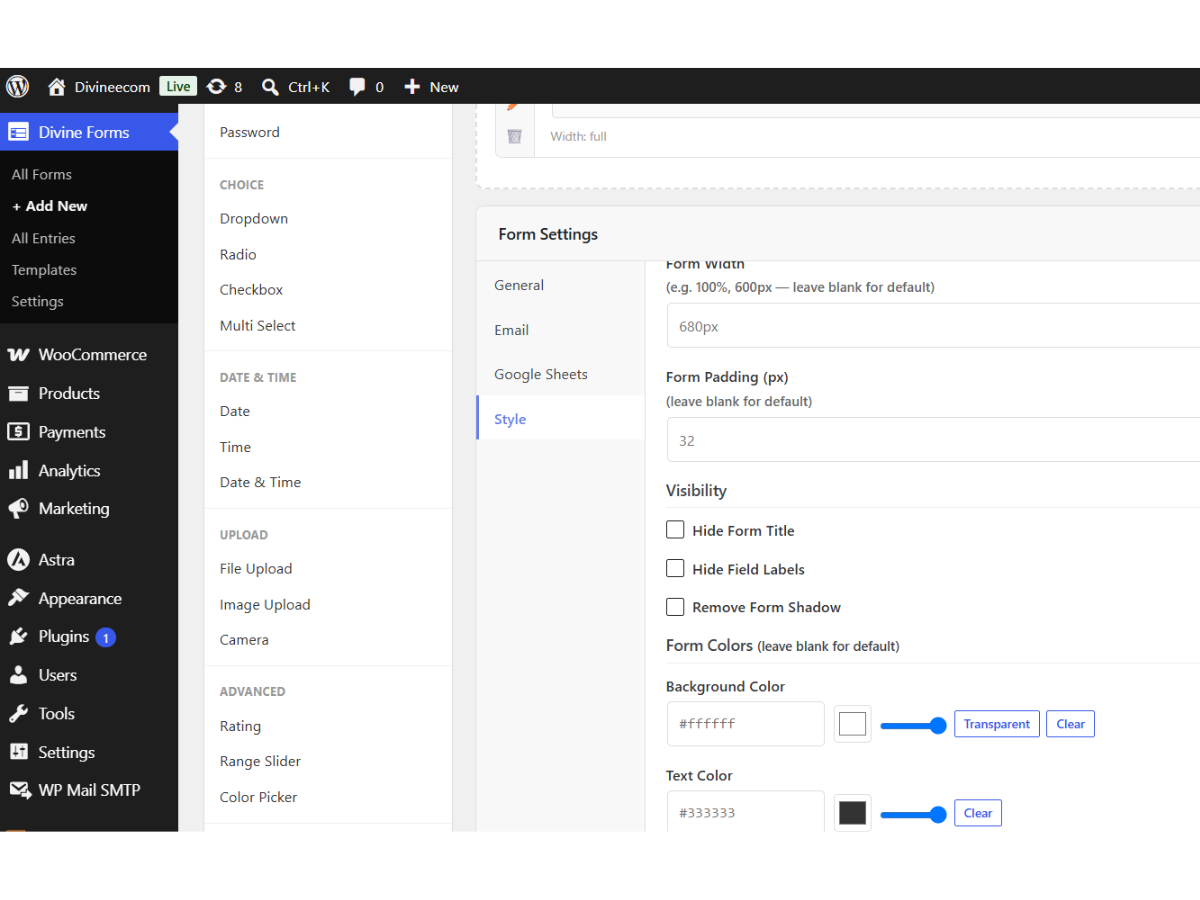
A contact form should look like a natural, cohesive element of your website design—not an ugly third-party widget slapped onto the page. Diviniket WP Forms features a built-in visual styling customizer that allows you to configure button colors, hover states, input border radiuses, typography, and container padding with instant visual feedback.
Whether your website uses a dark obsidian aesthetic, a clean minimalist corporate palette, or a vibrant creative scheme, the visual styler gives you complete design control without editing raw stylesheets or writing custom CSS overrides.
Everything you need for seamless form experiences
Comprehensive features built directly into Diviniket WP Forms without paid add-on paywalls.
Point-and-Click Styling
Adjust colors, margins, padding, and borders with intuitive visual sliders and color pickers.
Theme Native Inheritance
Forms automatically inherit your active WordPress theme font family for seamless typography matching.
Interactive Focus States
Configure active input glow colors so users clearly see where their cursor is positioned.
Button Customization
Style call-to-action buttons with custom background colors, hover transitions, and shadows.
Custom CSS Injector
Advanced designers can inject bespoke CSS rules targeted specifically to individual forms.
Dark & Light Mode Ready
Create high-contrast forms that look stunning against dark slate and crisp white backgrounds.
Get up and running in 4 simple steps
Diviniket WP Forms fits smoothly into your WordPress workflow with zero learning curve.
Open Style Customizer
Inside the form editor, click the Style & Appearance tab.
Choose Color Palette
Set your primary brand color, button background, text color, and input border.
Adjust Spacing & Radius
Fine-tune input padding, field margins, and corner roundness.
Preview & Save
Review the live changes in the canvas and click Save Form.
Detailed Specifications & Compatibility
| Styling Engine | Pure CSS Variables & Scoped Component Styles |
| Theme Compatibility | 100% compatible with Block themes, Elementor, Divi, Astra, Kadence, GeneratePress |
| Performance | Zero external font downloads (Inherits system or theme typography) |
| Responsive Scaling | Fluid typography and dynamic padding across mobile, tablet, and desktop |
| Cost | 100% Free |
Frequently Asked Questions
Common questions about Visual Form Styler & Customizer in Diviniket WP Forms.
Will the form match my website font automatically?
Yes. By default, Diviniket WP Forms inherits your theme typography so headings and inputs blend seamlessly.
Can I style different forms differently on the same site?
Yes. Every form maintains its own independent styling configuration.